
Understand the operational problem.
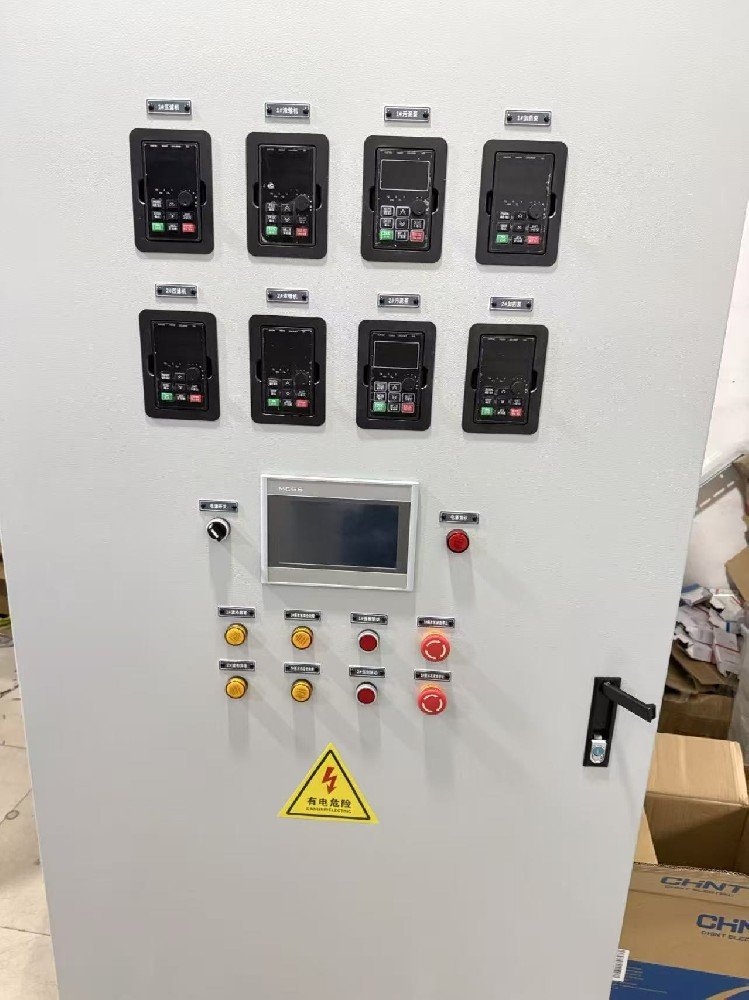
The published scope covers the main dewatering PLC cabinet together with local boxes for screens, a conveyor, a submersible mixer and auxiliary cooling fans. Main-cabinet operation and equipment-side operation therefore need to be planned together rather than treated as unrelated pieces of hardware.
Project at a glance
- Main cabinet
- Two machine groups · 8 drive panels · MCGS touchscreen
- Process organisation
- Manual/automatic operation and sequenced start/stop delays
- Field interfaces
- Local controls plus reserved remote commands and feedback
The control challenge
The two dewatering machines need recognisable manual/automatic operating groups, while auxiliary equipment must enter and leave the process in an agreed order. The central system also needs clear command and feedback interfaces to local panels.
Bring the layers together.
Conceptual control structure — an illustration, not a project screenshot or live data.
Group the two machines consistently
The published main cabinet has two groups of drive operator panels, eight panels in total, with an MCGS touchscreen and physical controls. The software organises machine 1 and machine 2 separately, including manual operation and automatic start/stop functions.
Express the process sequence in the controls
The documented startup begins with the air compressor and pressure condition, followed by the main process equipment, dosing, sludge feed, conveyor and discharge functions. Start and stop delay settings appear on the HMI; their actual values remain project-specific.
Define the local and remote interfaces
Screen/conveyor and mixer local boxes provide local start/stop, run/fault indication and manual/automatic selection. The requirements reserve automatic-mode, run and fault feedback together with a remote-start signal for upper-level integration.
What this example demonstrates.
The case demonstrates coordinated cabinet layout, HMI organisation and a defined field-interface scope. Indoor carbon-steel cabinets and outdoor double-door stainless-steel boxes appear as application-specific requirements in the source, not a generic enclosure or certification promise.
The gallery shows the actual main-cabinet photograph published with the Chinese case. The process narrative comes from the documented program/HMI scope and equipment requirements; it is not a fresh onsite inspection.
Detailed motor schedules, internal addresses and source projects are omitted. Installation environment, protective functions, acceptance tests and supply boundaries must be reviewed for each new project.
Read the original Chinese caseA similar application starts with your equipment.
Use this case as a discussion reference. The actual hardware, control sequence, interfaces and acceptance conditions need to be agreed for your project.